Pick your operating system:
but why would you want to block all pornography if you want to quit all pornography? EasyPeasy says that you don't have to do it.
◄ Matthew 5:30 ►
And if your right hand causes you to stumble, cut it off and throw it away.

It is better for you to lose one part of your body than for your whole body to go into hell.
Hand obviously means reach. The point is to remove temptation sites for your need. So you can block more than the ones blocked with this method, for example if telegram drags you down, uninstall it; If youtube is a temptation, block it entirely aside some whitelisted channels , and use alternatives like odysee or soundcloud.
If an alcoholic in recovery were to sleep with his bottle, it would be non-sense, but that's what people who seek to stop using pornography do. Obviously the addictive drive would take over.
You can't quit crack cocaine while having infinite and free crack cocaine all around you. That's what pornography is, literally, as proven by real science. Mere suppression doesn't work.
A radical change is needed.
Change your overall routine and your Self Identity ~ I am free ~ and feel this way, then you block all the pron, and you become free and enjoy your life again!!

。・:*:・゚★。・:*:・゚☆。・:*:・゚★。・:*:・゚☆
Search engines like
Ecosia, brave, duckduckgo, Mojeek
suck, as they link pron. Instead, Use:
🌟Bonus: Download IceBreathing for your PC; no horny - webapp + BREATHLY , an app for daily pranayama .
Invidious Youtube + Translator FrontEnd + nitter instance
soundcloud frontend | 2 | 3
You can use https://reddit.nerdvpn.de/r/nofap | https://safereddit.com/r/semenretention | https://redlib.r4fo.com for reddit. They are SFW only.
libredirect / 2 use this and configure it for only these instances aforementioned.
Pick a cool theme like
Gruvboxdark
,
subscribe to some subreddits and enjoy your feed as a lurker.
There's also Nuvio for watching movies and series, on all platforms, for free.
Make a list with things to do when temptation hits, then you would lock the devices and flee from lust; tasks such as:
- a cold shower
- a long walk
- 20m pranayama
- workout
- prayer
- meditation
- 70 burpees
- pranayama again
。・:*:・゚★。・:*:・゚☆。・:*:・゚★。・:*:・゚☆
The Synergy of this Block Explained:
Windows Config
7 / 8.1 / 10 / 11 - all work
1. Install Cold Turkey
Install Cold Turkey ~
It still DOES work even without pro.
On windows, since this app isn't available on linux, you can use a debloated version like ReviOS/Tiny11/LTSC/AtlasOS etc. if you please so.
Win activator that offers extended updates (ESU) for free.
Download My Config | mirror and import it.
By clicking on the 3 lines, aka hamburger button, in the top right, and then Import.
Take a look at the blocks and comprehend what keywords are blocked.
The block
Keywords
blocks most keywords that can be used to access pron;
AFTER
you implement the rest of the settings,
lock Cold Turkey →
Keywords
&
Browser
for ~ a month.
Pick a cool theme like
Gruvboxdark
,
subscribe to some subreddits and enjoy your feed as a lurker.
There's also Nuvio for watching movies and series, on all platforms, for free.
Make a list with things to do when temptation hits, then you would lock the devices and flee from lust; tasks such as:
- a cold shower
- a long walk
- 20m pranayama
- workout
- prayer
- meditation
- 70 burpees
- pranayama again
。・:*:・゚★。・:*:・゚☆。・:*:・゚★。・:*:・゚☆
The Synergy of this Block Explained:
Windows Config
7 / 8.1 / 10 / 11 - all work
1. Install Cold Turkey
Install Cold Turkey ~
It still DOES work even without pro.
On windows, since this app isn't available on linux, you can use a debloated version like ReviOS/Tiny11/LTSC/AtlasOS etc. if you please so.
Win activator that offers extended updates (ESU) for free.
Download My Config | mirror and import it.
By clicking on the 3 lines, aka hamburger button, in the top right, and then Import.
Take a look at the blocks and comprehend what keywords are blocked.
The block
Keywords
blocks most keywords that can be used to access pron;
AFTER
you implement the rest of the settings,
lock Cold Turkey →
Keywords
&
Browser
for ~ a month.
Make sure to do pranayama for at least 15m.
You can write the list on a piece of paper or write it in notepads or on Rentry and export it.
stop
is to block the browser temporarily
when encountering strong temptations
and
keywords
is the main block to block all pornography.
This script will turn on the block
stop
when you use it;
that will block the browser for a few hours,
when temptations arise.
Install the Cold Turkey extension properly, and configure it by allowing access to incognito tabs.
Open brave, right click on the cold turkey extension, click:
manage extension
and give it all the permissions needed.
AFTERWARDS , disable incognito, tor mode and guest profile, with the following commands:
Run them in cmd with admin, you can paste the entire block at once:
REG ADD HKLM\SOFTWARE\Policies\BraveSoftware\Brave /v BlockExternalExtensions /t REG_DWORD /d 0

REG ADD HKLM\SOFTWARE\Policies\BraveSoftware\Brave /v BraveAIChatEnabled /t REG_DWORD /d 0

REG ADD HKLM\SOFTWARE\Policies\BraveSoftware\Brave /v BraveNewsDisabled /t REG_DWORD /d 1

REG ADD HKLM\SOFTWARE\Policies\BraveSoftware\Brave /v BraveTalkDisabled /t REG_DWORD /d 1

REG ADD HKLM\SOFTWARE\Policies\BraveSoftware\Brave /v BraveVPNDisabled /t REG_DWORD /d 1

REG ADD HKLM\SOFTWARE\Policies\BraveSoftware\Brave /v BrowserAddPersonEnabled /t REG_DWORD /d 0

REG ADD HKLM\SOFTWARE\Policies\BraveSoftware\Brave /v BrowserGuestModeEnabled /t REG_DWORD /d 0

REG ADD HKLM\SOFTWARE\Policies\BraveSoftware\Brave /v IPFSEnabled /t REG_DWORD /d 0

REG ADD HKLM\SOFTWARE\Policies\BraveSoftware\Brave /v TorDisabled /t REG_DWORD /d 1

REG ADD HKLM\SOFTWARE\Policies\BraveSoftware\Brave /v IncognitoModeAvailability /t REG_DWORD /d 1
The block
Browser
blocks brave
(it should be your only browser)
during night,
from 22:00 → 06:00 every day,
because most temptations arise at night.
But you can play games, watch offline content, read downloaded books.. or even access certain websites though nativefier .
You can turn websites like these into an app with it.
Plus you can install a PS2/PS3/PS4 emulator and play console games on your PC. or read books, watch documentaries, etc etc.
Lock
Browser
and
Keywords
for like ~ a months
by using the 🔒 button at each block,
AFTER
you finish with the rest of the steps.
3. Download my hosts file
Download THIS | mirror and put it in:
C:\Windows\System32\drivers\etc\
Open it in notepad and comprehend that the sites and domains listed there will be blocked, you're free to remove some, or add your own. Up to you.
Go to the hosts file, right click on it, select Properties and configure it like this:
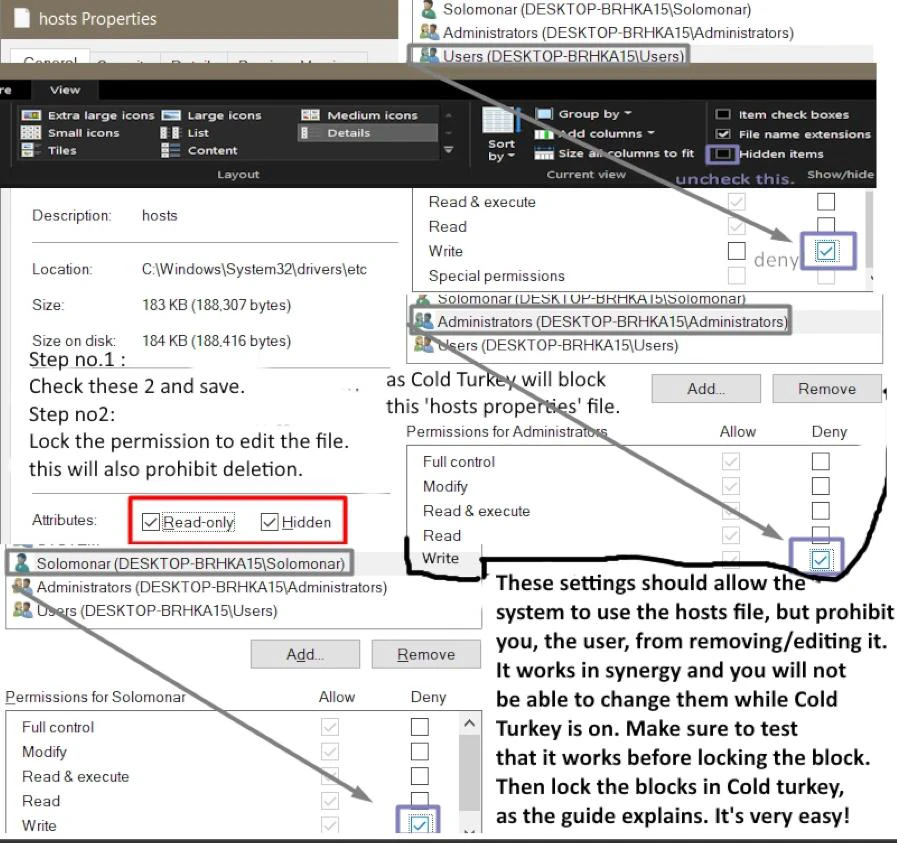
Cold turkey will block the 'Host properties' tab and you will not be able to change these settings, hence you won't be able to edit or delete the hosts file, given that you configured it like this.
Make sure to not deny permission to the system from reading it; Only you, the admin/user should not be allowed.
qBittorrent note:
You should Update qBittorrent to the last version, and then go to:
appdata → Local → qBittorrent
(or use
%LocalAppData%
in run)
and delete:
nova3
This will only disable the search plugins.
You can use the sites at the bottom of the hosts file and this , also save your own magnets if need be.
4. Download DNS software:
Download THIS software to change your DNS.
Checkmark:
- ✔ APPLICATION UNINSTALL PROTECTION
- ✔ enable HARDENING from Settings
Then select:
Free adult filter
Then go to settings again & add a random password, then forget it.
This will only block 99.99% of porn sites so you won't need to undo it.
If you find an xxx site that isn't blocked by their filter, please send them an email and let them know to block it at:
support@cleanbrowsing.org
AND
Go to:
brave://settings/shields/filters
and click on:
Show Full list
and check:
- ✅ Pron Blocker - blocklist anti-pron
Then click:
Update list
and save.
Safe Mode PATCH
You can also prevent the access to safe mode, so in this way it will be impossible to uninstall cold turkey. Use both methods.
Warning: If you've blocked Safe Mode, full Windows reinstall is the only way to remove Cold Turkey. This is irreversible. Don't attempt to bypass via SafeMode, you can't and your PC will get stuck in a bootloader. Forget about Safe Mode. Use your PC normally. If you want to make changes in ColdTurkey, just wait for the block time to pass.
Method #1
Open command prompt in admin, type this:
reg delete HKLM\SYSTEM\CurrentControlSet\Control\SafeBoot /f
Or open PowerShell in admin, type this:
Remove-Item -Path "HKLM:\SYSTEM\CurrentControlSet\Control\SafeBoot" -Recurse -Force
Method #2
Open command prompt in admin, type these lines; you can paste all of them at once.
reagentc /disable

bcdedit /set {bootmgr} displaybootmenu no

bcdedit /set {current} bootems off

bcdedit /set {current} advancedoptions off

bcdedit /set {current} optionsedit off

bcdedit /set {current} bootstatuspolicy IgnoreAllFailures

bcdedit /set {current} recoveryenabled off
Cold Turkey final lock
Once you configured the Hosts file, the DNS and safe mode, then open Cold Turkey and Lock the block by clicking on lock 🔒 on each block.
Lock them
(Keywords & Browser are the main blocks)
except:
Stop
for like 1 month.
If you aim for a 90 days fast reboot, then you would have to 🔒 Lock 🔑 the blocks 3 times.
OPTIONAL - Router DNS
At the router level you can also change the DNS, given that your ISP allows it.
DNS1:
185.228.168.10
DNS2:
185.228.169.11
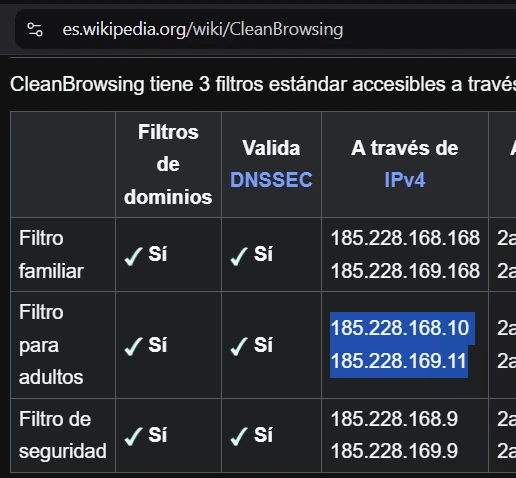
OPTIONAL
Bonus: You can also disable Regedit and CMD with the following commands:
REG ADD HKEY_CURRENT_USER\SOFTWARE\Policies\Microsoft\Windows\System /v DisableCMD /t REG_DWORD /d 2

REG ADD HKEY_CURRENT_USER\SOFTWARE\Microsoft\Windows\CurrentVersion\Policies\System /v DisableRegistryTools /t REG_DWORD /d 1
To un-do, you would have to install another registry app to remove the keys manually. You can't do this when you turn on the Lock (in Cold Turkey).
OPTIONAL #2
These commands block additional bypass methods:
reg add HKCR\SystemFileAssociations\.inf\shell\Install /v LegacyDisable /f

reg delete HKCR\SystemFileAssociations\.inf\shell\Install /f

reg add "HKLM\SOFTWARE\Microsoft\Windows\CurrentVersion\Policies\Explorer" /v SettingsPageVisibility /t REG_SZ /d "hide:network-proxy;network-vpn" /f

reg delete "HKCR\batfile\shell\open" /f

reg delete "HKCR\batfile\shell\runas" /f
I don't really recommend to disable them, unless need be, to patch things.
OPTIONAL #3
Reset the DNS with these commands if things get stuck.
ipconfig /flushdns

ipconfig /release

ipconfig /renew

netsh winsock reset

netsh int ip reset
OPTIONAL #4: The ultimate patch
The ultimate patch to make the block immutable by all means;
If you somehow found a way to bypass, make a standard account for you and add a password to the admin account;
Give it to a friend or send it to your future self via future mail .
Without admin privileges, the windows architecture prohibits uninstalls, because you'd lack permissions.
But there is NO need for this, unless you're a super advanced coder and can code your own CLI console from scratch or something.
OPTIONAL #5: Configure the firewall
Configure the firewall, so that it blocks all the other DNSes and ports, except the CleanBrowsing DNS and its ports.
Save this script as:
firewall.ps1
on Desktop.
By pasting it in a notepad file,
with the
.ps1
extension.
Run this script with PowerShell as administrator.
cd $env:USERPROFILE\Desktop
.\Firewall.ps1
If needed:
Set-ExecutionPolicy -Scope Process -ExecutionPolicy Bypass
Then lock it with Cold Turkey using:
terminal + firewall | optional
!!! note Don’t forget to share our project with your friends and on social media! 😊 Thank you!🌟
How to block Porn on android:
You can also add the aforementioned hosts file on your android ( pornaway or manually), IF IT IS rooted.
Install Brave (~~Firefox~~ / ~~Firefox Lite~~ / ~~Vivaldi~~ / ~~Samsung Internet~~). Only these browsers are compatible.
Install your extensions, then block the extension page too with the filter.
I recommend Brave because its native adblocker is compatible with my hosts file and the native DNS filter, that both can be locked with NoPox.
It's based on Chromium, yet open source, and extremely fast; and has 3 unique features that make it the best to block pron.
On Brave you can also go to:
Settings → Brave Shields → Content Filtering
and check:
- BlockLists Antiporn
- YouTube Anti-Shorts
Install NoPox 1.0.53
Set up the VPN / DNS first.
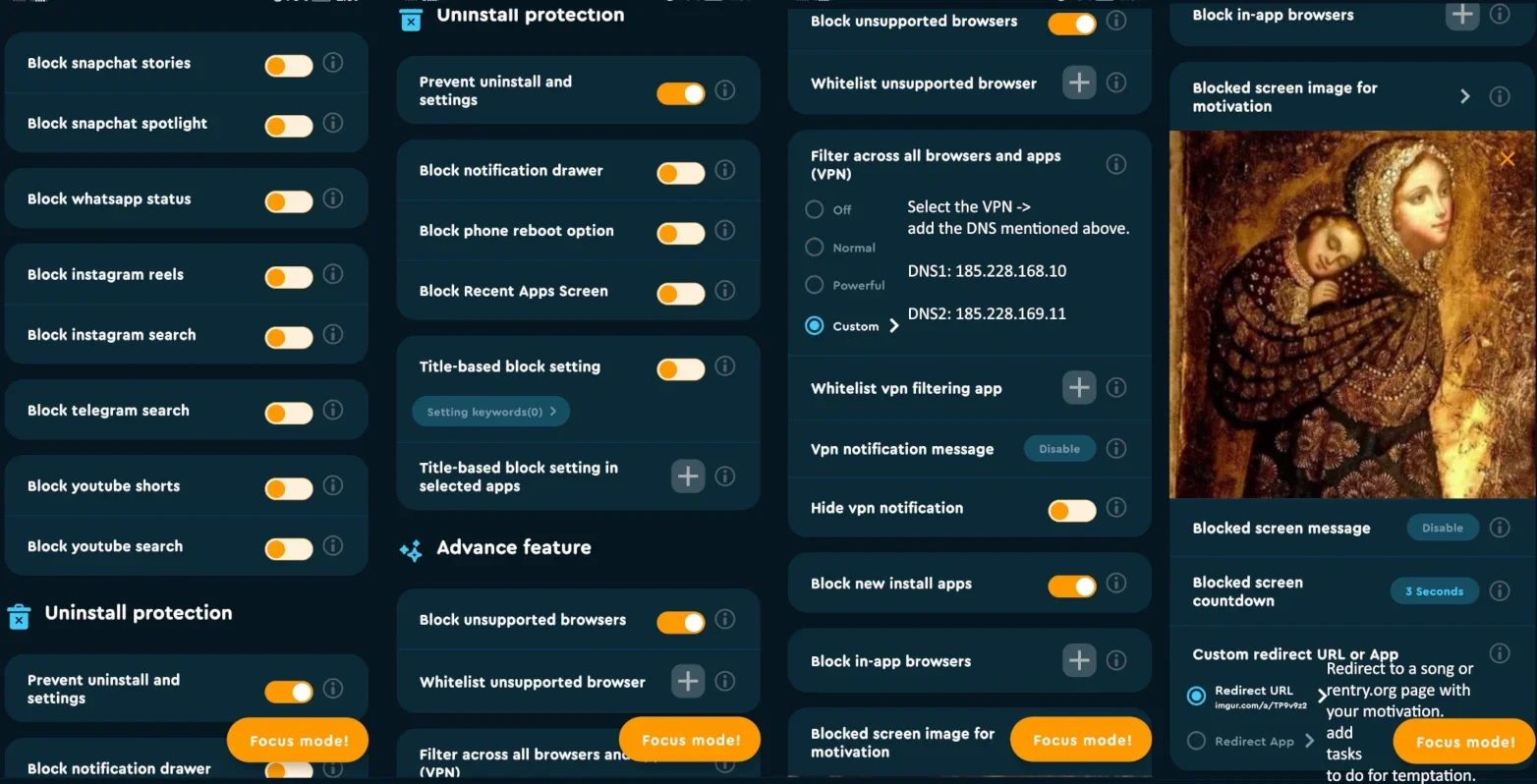
Select the VPN → add the DNS mentioned below.
DNS1: 185.228.168.10

DNS2: 185.228.169.11
AND go to:
Brave Settings → Brave Shields → Use Secure DNS
And add:
https://doh.cleanbrowsing.org/doh/adult-filter/
Go to:
Brave Settings → Brave Shields → Content Filtering → Create Custom Filters
and block more websites. Add the list of sites that you want to block, such as this, for quora, with this specific format, lower-case:
quora.com##html
AND add:
https://codeberg.org/1freelife1/FreeLife/raw/branch/main/~android_blocker~.txt
to:
Add custom filter list
AND also check:
- ✅ Pron Blocker - blocklist anti-pron
Then click:
Update list
and save.
You can also use Focus Mode feature, as a widget, to block your phone for ~5 hours, when temptation hits.
In that case, add a bunch of whitelisted apps, to listen to music, read books, and access basic apps.
How to block Porn on IOS:
First of all, install foqos and block all the apps that you use to access pron, or uninstall them.
Install the CleanBrowsing App and configure the adult filter and prevent uninstall, then lock the app with foqos.
Then Install Brave Browser .
Brave Settings → Brave Shields → Content Filtering → Create Custom Filters
quora.com##html
https://codeberg.org/1freelife1/FreeLife/raw/branch/main/~android_blocker~.txt
Add it to:
Add custom filter list
Also check:
- ✅ Pron Blocker - blocklist anti-pron
How to block Porn on MAC:
Install Brave Browser.
brave://settings/shields/filters
Click:
Show Full list
and check:
- ✅ Pron Blocker - blocklist anti-pron
Linux
Install Brave Browser.
brave://settings/shields/filters
Click:
Show Full list
and check:
- ✅ Pron Blocker - blocklist anti-pron
Install the DNS mentioned in the guide, configure the hosts file, and use parental controls and firewall rules.
More resources: awesome-Adult-Content-Filtering
Also use: Timekpr-nExT to lock the PC at times.
!!! note Don’t forget to share our project with your friends and on social media! 😊 Thank you!🌟

Stay consistent. Every day counts.